 Just Freakin’ Do It!All tools
Help › Map maker
Map maker guide
How to turn a table of countries, US states or counties, or UK regions, councils or constituencies and their numbers into a clear, honest map, and download it, share it or put it on your website. Everything happens in your browser; your data is never uploaded.
Quick start
- Add your data. Drop a spreadsheet onto the page (CSV, Excel or JSON), or paste cells copied from Excel or Google Sheets into the box and press Make the map. You need one column of places (names or codes) and one column of values.
- Check the matches. The Data section shows which map is being used (the world, the US or the UK, picked from your data) and how many rows were matched. If any weren't recognised, press Fix and choose the right place for each.
- Style it. Choose colours, the kind of scale, the area of the world, labels, a title and a source.
- Download or share. PNG, SVG or PDF, a copy to paste elsewhere, a share link, or embed code for your website.
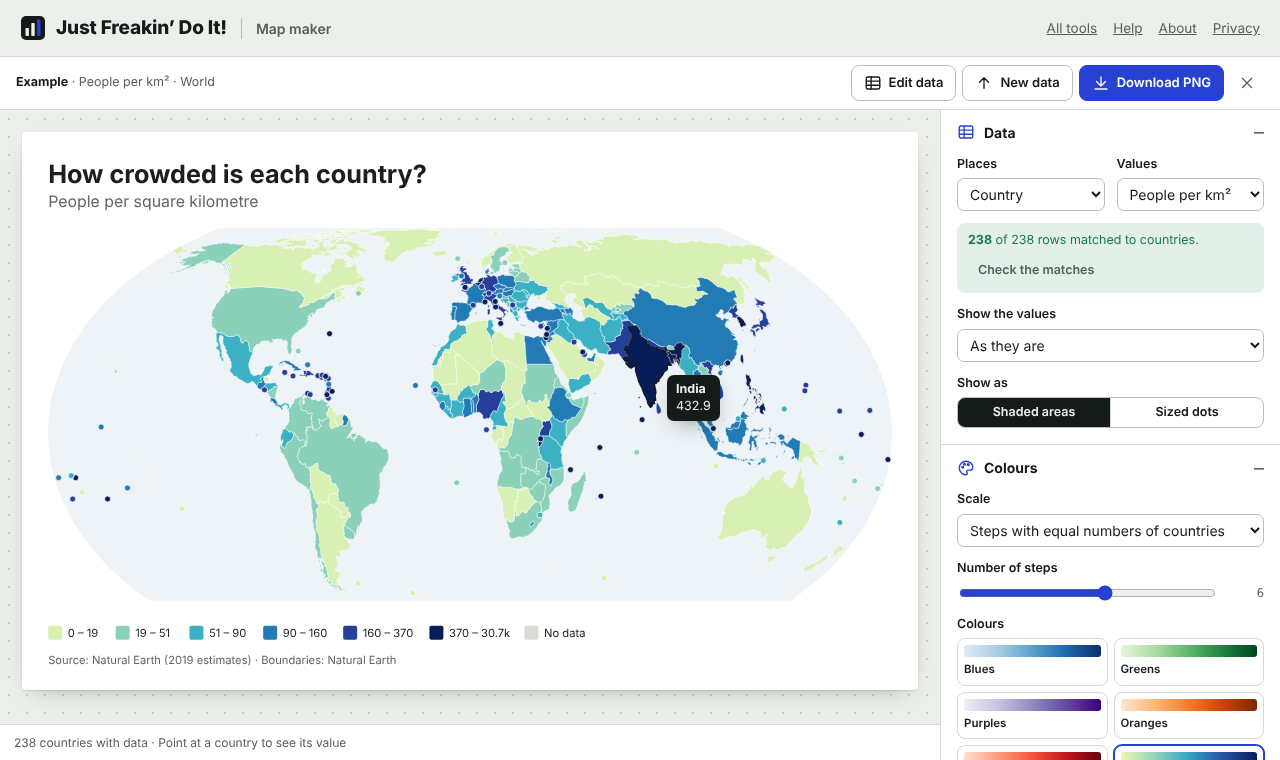
Not sure where to start? The examples on the first page (population density, income per person, income groups, population, US states, US counties, UK local authorities, UK constituencies and a map of Europe) open ready-made maps you can change.
Getting your data in
The map maker reads the table and works out which column holds the places, which holds the values and, for long tables, which holds the year. You can change any of these under Data.
- World Bank downloads work as they are: the notes above the table are skipped, the latest year with data for most countries is chosen (pick another from Values), the title comes from the indicator name, and groups such as World, Euro area or High income are recognised and left out.
- Our World in Data downloads, with a row per country per year, get a Year picker. Regions such as Africa or High-income countries are left out.
- Excel workbooks: the sheet with the most places on it is used, so a notes sheet at the front doesn't get in the way.
- Numbers written in different ways are understood:
1,234.5,1.234,5,12%,$40k,2.5bn. Cells such as..,n/aor–count as no data. - Words instead of numbers (such as In force, Planned) make a map of categories, each with its own colour.
If a place appears more than once (and there's no year column), you can choose to use the first value, the last, the total or the average. To change the data, press Edit data; to load another file, press New data.
How places are matched
Each place is matched to a country however it's written:
- Names in everyday English and official forms: UK, Britain, United Kingdom of Great Britain and Northern Ireland.
- The spellings used by the World Bank, UN, IMF and others: Korea, Rep., Iran (Islamic Republic of), Türkiye, Viet Nam, Congo, Dem. Rep.
- Names in other languages, such as Deutschland, España or Brasil, and old names such as Burma or Swaziland.
- Codes: ISO three-letter (
FRA), two-letter (FR) and number (250) codes, World Bank codes and Our World in Data codes.
Anything that isn't recognised is listed when you press Fix. Typing mistakes come with a suggestion (Untied Kingdom → United Kingdom?); press it to accept, or choose any country from the list. Places that are part of a country on the map, such as England or Hawaii, are suggested as that country, but think about whether that's what you want: England's figure isn't the United Kingdom's. Rows you leave as Not on the map are simply left out. Accept all suggestions takes the best suggestion for every row that has a good one.
US states and counties
When your data is about US states or counties, the map maker switches to a map of the United States by itself, and tells you it has. You can change the map at any time under Data › Map:
- United States: states, the 50 states, the District of Columbia and Puerto Rico. Alaska, Hawaii and Puerto Rico are drawn in boxes near the mainland (Alaska at a smaller scale); everything else is at its true relative size.
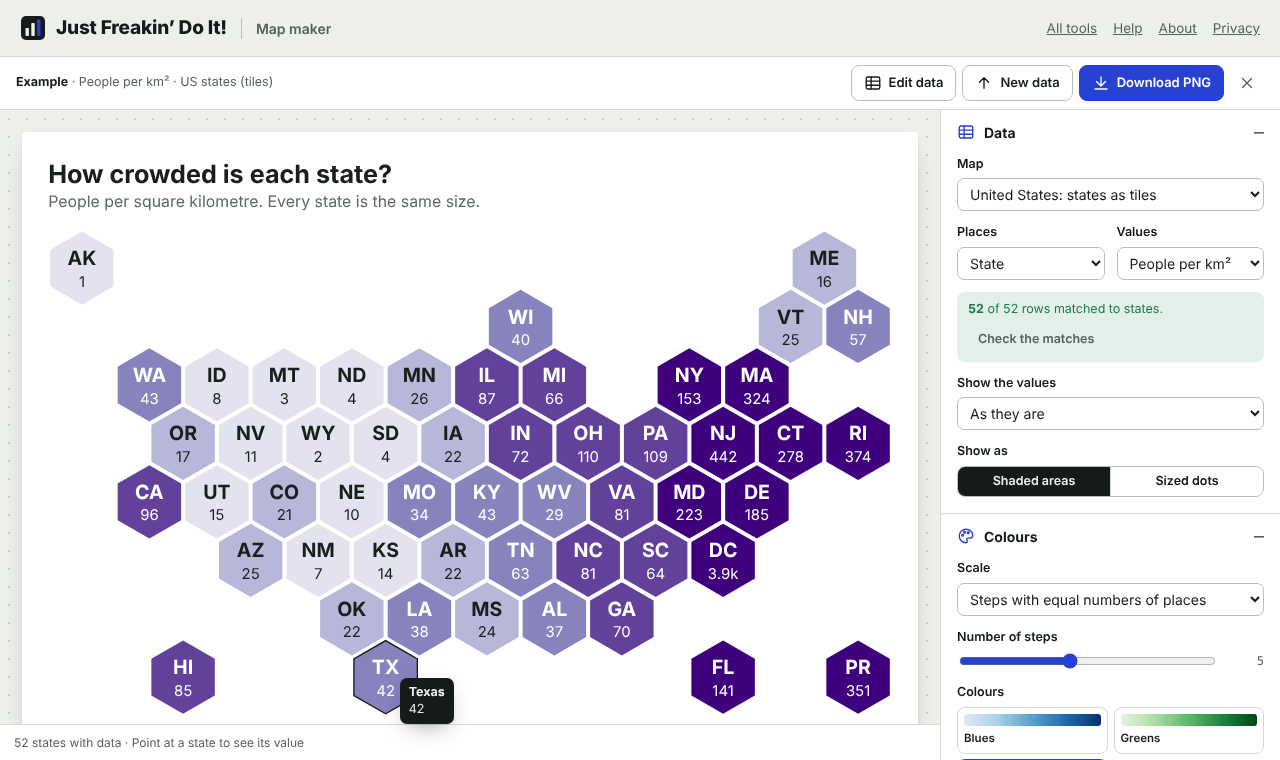
- United States: states as tiles, with every state the same size, as hexagons or squares (choose under Map › Tile shape), laid out roughly where the states are. A normal map is dominated by big, empty states; on a tile map, Rhode Island counts as much as Texas. Tiles show the state's code and, if you turn on value labels, its value.
- United States: counties, about 3,200 counties and county-equivalents, with state borders drawn over them. If all your data is in one state, or a few neighbouring ones, the map zooms in, with the surrounding states in grey. Choose a different state, or the whole country, under Map › Area.
States are matched by name, two-letter postal code (CA), AP abbreviation (Calif.), FIPS code (06 or 6) and codes like US-CA. Counties are matched by their five-digit FIPS code, even when a spreadsheet has dropped the leading zero (1001 for Autauga County, Alabama), or by name with the state, written any common way:
- Cook County, Illinois, Cook County, IL, Cook, IL or Cook County IL.
- The county in one column and the state in another: the map maker finds the state column and puts the two together. You can set it yourself under Data › State column.
- Parishes (Louisiana), boroughs and census areas (Alaska), municipios (Puerto Rico), Virginia's independent cities (Fairfax city and Fairfax County are different places), St. or Saint, with or without accents.
Rows for the whole country or a whole state, such as United States or a state's total in a table of counties, are left out, like groups of countries on a world map. A county name on its own, with no state, is matched only if just one county has that name; the matching list shows every county with that name for the rest.
The county map uses current county boundaries, so a few older names and codes need care:
- Connecticut replaced its eight counties with nine planning regions in 2022, and current Census data uses the regions. Data for the old counties (such as Fairfield County or code
09001) can't be shown, and the matching list says why. - Alaska: Valdez-Cordova split into Chugach and Copper River in 2019. The map has the combined Valdez-Cordova area; data for the two new areas is suggested as part of it.
- Renamed counties match their new names: Shannon County, South Dakota, is Oglala Lakota, and Dade County, Florida, is Miami-Dade.
Guam, American Samoa, the Northern Mariana Islands and the US Virgin Islands aren't on the US maps.
UK nations, regions, councils and constituencies
UK data gets a map of the United Kingdom automatically, at the right level. You can change it under Data › Map:
- Nations: England, Scotland, Wales and Northern Ireland.
- Regions and nations: England's nine regions with Scotland, Wales and Northern Ireland (the 12 areas of most ONS regional tables).
- Local authorities: all 361 councils as they have been since April 2023, with region borders drawn over them. If your data covers one region or nation (London's boroughs, say, or Scotland's council areas), the map zooms to it.
- Local authorities sized by population: the House of Commons Library's cartogram, where each council is made of small hexagons (one for about 8,000 people) and councils are grouped by county. Cities get the space their populations deserve, which a normal map, dominated by the Highlands, never gives them.
- Constituencies (2024): the 650 Westminster constituencies drawn at the July 2024 general election.
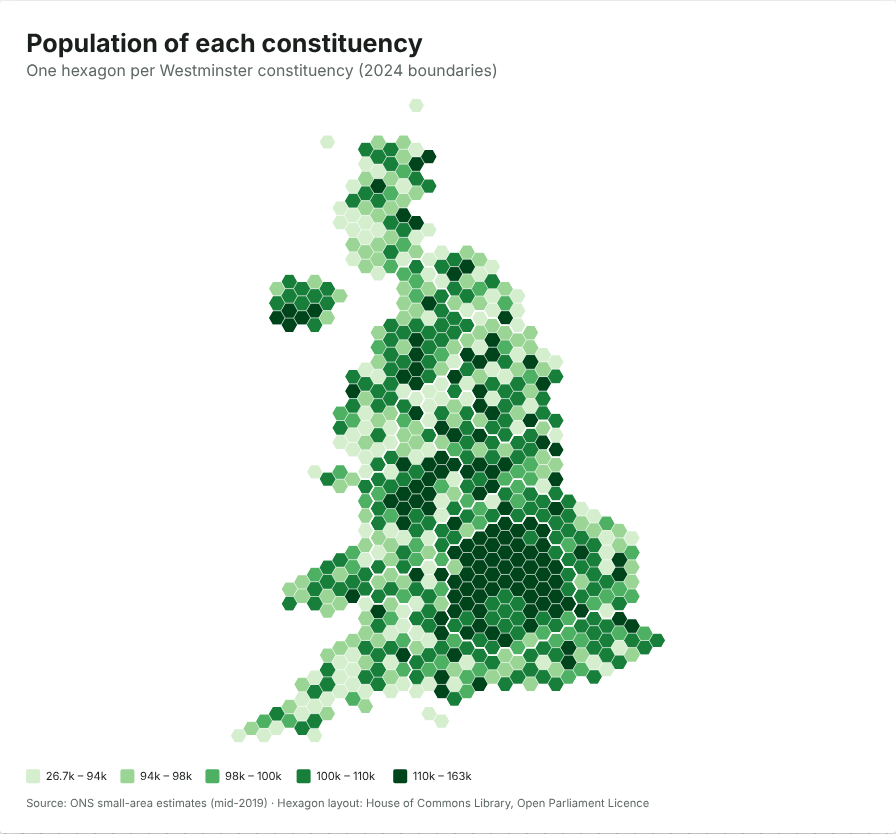
- Constituencies as hexagons (2024): one hexagon per constituency, in the House of Commons Library's layout. Constituencies have similar numbers of voters, so this is the fair way to show election results, and it's what you get by default for constituency data.
Shetland is drawn in a box east of Orkney, as on ONS maps.
Places are matched by ONS code (such as E09000033, S12000036 or E14001063), ITL region code (TLI, or the older UKI), and by name, however it's written: Bristol, City of, City of Bristol, Bristol City Council and Bristol all match, as do Hull, County Durham, Rhondda Cynon Taff, Western Isles and Welsh names such as Caerdydd or Ynys Môn. Regions match their everyday names (East, Yorkshire & Humber).
ONS tables often mix in totals: the UK, nations, regions, counties such as Kent or Essex, and combined authorities. These are recognised and left out, so they don't land on a council by mistake.
Some data is on older boundaries:
- In April 2023, councils in Cumbria, North Yorkshire and Somerset were merged into Cumberland, Westmorland and Furness, North Yorkshire and Somerset. Rows for the old councils (such as Allerdale or Harrogate, or their codes) are listed with the new council suggested. Accept it only if adding the old councils up makes sense for your data.
- Constituency boundaries changed at the July 2024 election. Codes of the old constituencies are recognised and explained. Many names didn't change, so check that constituency data is for the new boundaries.
When the categories are political parties (UK or US), they get their parties' usual colours, as election maps do. Choose another colour set under Colours if you prefer.
Making a map that doesn't mislead
A shaded map is good at showing rates (per person, per km², percentages) and bad at showing totals. Shade countries by total population, deaths or emissions and the biggest countries look darkest simply because they're big, while small, crowded countries all but disappear. The map maker watches for this:
- When your numbers look like totals (they rise and fall with population, or the column is called something like Total, Number or Deaths), a note suggests a fairer way to show them: Per million people, Per km² or Sized dots. You can also choose Keep as it is.
- Show the values divides each value by the place's population (per person, per 1,000, per 100,000 or per million people) or by its land area. The population figures are Natural Earth's 2019 estimates for countries; the US Census Bureau's 2019 estimates for states and counties (2020 census counts for Connecticut's planning regions); and the ONS's mid-2020 estimates for UK councils, regions and nations, with its small-area estimates (mid-2019) added up for each 2024 constituency; for the most exact results, divide by your own population figures before you start. The map's source line says which figures were used.
- Sized dots put a circle on each country, sized by its value (by area, so a value twice as big gets a circle twice the area). This is the right way to show totals on a map.
- Equal Earth, the standard projection, keeps every country's size true. Mercator, the projection of web maps, makes Greenland look as big as Africa, so you'll see a warning if you choose it for a shaded map.
- Small places such as Singapore, Malta or the Caribbean islands, or the District of Columbia on a US map, would be invisible, so they're drawn as dots in their colour. You can turn this off under Map.
- Tile maps of US states and hexagon maps of UK constituencies give every area the same space, and the population-sized council map gives each council space in proportion to its people. These are the fairest ways to compare places that differ hugely in size.
Colours and scales
| Scale | Best for |
|---|---|
| Steps with equal numbers of places | Most data. Each colour covers about the same number of places, so the map uses its whole range of colours. |
| Steps at natural breaks | Data that falls into clusters. Steps go where the gaps between values are biggest. |
| Equal-sized steps | Values spread evenly, or when round step sizes matter more than balance. |
| My own steps | Thresholds that mean something, such as 50% or a target. Type the numbers where one colour should end and the next begin. |
| Smooth gradient | Seeing every difference. Turn on Log scale for values that span several orders of magnitude, such as income or population. |
- Light-to-dark colours (Blues, Greens, Viridis and so on) suit values that run from low to high.
- Two-sided colours (Red–blue, Orange–purple, Brown–teal, Pink–green) suit values above and below a middle point, such as change since last year. Set the Middle value; it's zero automatically when your data has values on both sides of it.
- Categories get the Okabe–Ito colour-blind-safe colours unless you choose another set. Change any colour, and move categories up and down the legend. Categories with a natural order, such as Low, Medium, High, are put in that order for you.
- Places with no data are grey; change the colour under Colours › No data. There's also a dark theme.
Areas, projections and labels
- Area: the map zooms to fit your data automatically. If all your countries are in Europe, you get a map of Europe. Choose the world, a continent or a region yourself under Map › Area. Regional maps use an equal-area projection centred on the region, so sizes stay true and shapes look natural.
- Projection (world maps): Equal Earth, Natural Earth, Mercator, Plate carrée or a globe you can turn and tilt. Centre on longitude moves the middle of the map, for example to put the Pacific in the centre.
- Labels: names, values, or both, on places big enough to hold them. Labels never overlap.
- Before numbers and After numbers add units such as
$or%; Decimal places sets how values are rounded in the legend and when you point at a country. - Antarctica is hidden unless you turn it on, which gives more room to everywhere else.
Using your own boundaries
To map states, provinces, regions, constituencies or anything else, press Map › Use my own boundaries… and choose a GeoJSON or TopoJSON file. Your data is matched to the areas by any name or code in the file, in any capitalisation. If you haven't added data yet, the map maker starts a table with every area's name for you to fill in under Edit data. Lines and points in the file are ignored.
Share links can't carry your own boundaries (they would be too long). Use Save map file instead, which keeps the boundaries, the data and every setting.
Downloads, sharing and embedding
| Option | What you get |
|---|---|
| PNG | A picture at twice the chosen width, sharp on high-resolution screens and in slides. |
| SVG | A vector file that stays sharp at any size and can be edited in Illustrator, Figma or Inkscape. Each country shows its value when you point at it. |
| A vector PDF with real text, ready to print. If the title uses letters outside the standard PDF fonts (for example Chinese or Arabic), the PDF holds a sharp picture of the map instead. | |
| Copy | The map as a picture on your clipboard, to paste into a document, slide or message. |
| Copy share link | A link that opens this map with your data and settings. The data travels inside the link itself, not through our server, so anyone you give the link to can see the data. |
| Embed code | Code to paste into a web page. The map fits any width and shows each country's value when visitors point at it. Everything is in the code: nothing loads from this site. |
| Save map file | A .map.json file with your data and settings. Open it again with Open a map file…. |
| Download the data | A CSV of your rows with the place each was matched to and its ISO code (or FIPS code for US maps), useful for checking or for other tools. |
Size sets the width: 960 pixels suits most reports and web pages; there's also a square 1,080 × 1,080 for social media posts.
Every map gets a description for screen readers, written for you (what the map shows, the highest and lowest values). Change it under Text and labels if you like. It goes into the SVG and the embed code.
Saving your work
Your latest map is kept in this browser, so if you close the tab you can pick up where you left off with Continue your last map on the first page. Maps using your own boundaries aren't kept this way; save a map file. Clearing your browser's site data removes the kept map.
Privacy
Your data is read and drawn inside your browser. Nothing is uploaded and nothing is sent to anyone else. The boundaries come from this site, not from a map service. Share links hold the data in the part of the address after the #, which browsers never send to a server.
Where the boundaries come from
Country boundaries, names, codes and the population and area figures come from Natural Earth (public domain), at a scale of 1:50 million. Borders follow Natural Earth's policy of showing the boundaries in force on the ground; some are disputed.
US state and county boundaries come from the US Census Bureau's cartographic boundary files (public domain) at a scale of 1:10 million, as prepared by the us-atlas project, with Connecticut's planning regions from us-counties-10m-topojson. US population figures are the Census Bureau's 2019 estimates, from the lookup table in the COVID-19 Data Repository by the Center for Systems Science and Engineering (CSSE) at Johns Hopkins University (CC BY 4.0).
UK boundaries are the Office for National Statistics' generalised boundary files: the ONS's own map-making set for nations, regions and local authorities (from ONSvisual, 2022 boundaries updated here for the April 2023 mergers) and the July 2024 Westminster constituencies. They're published under the Open Government Licence and contain Ordnance Survey data © Crown copyright and database right. The hexagon layouts are by the House of Commons Library, under the Open Parliament Licence. Council names, areas and populations come from mySociety's register of local authorities, and constituency populations from mySociety's 2025 constituencies data, both based on ONS figures.
Maps credit their boundaries at the bottom unless you use your own. UK maps carry the Crown copyright notice that the Open Government Licence asks for; keep it if you crop or edit a map.
Common questions
A country is missing from my map.
Press Check the matches under Data and choose Everything to see what each row was matched to. If the row is there but has no value, its cell may hold text such as n/a. A few very small territories (Gibraltar, for example) are too small to appear on a world map at this scale.
Why is my map mostly one colour?
Usually because a few very large values stretch the scale. Choose Steps with equal numbers of places, or a smooth gradient with Log scale turned on.
Can I make maps of other countries' regions?
US states and counties and the UK's nations, regions, councils and constituencies are built in (see US states and counties and UK nations, regions, councils and constituencies). For anywhere else, use your own boundaries file: see Using your own boundaries. Free GeoJSON files for most countries' regions are available from national statistics offices and from projects such as geoBoundaries.
My US county map is very busy. What can I do?
With 3,000 counties, a smooth scale often works better than steps; turn on Log scale for things like population density. Thinner borders (Map › Borders) help too. If you only need one region, choose it under Map › Area.
Can I use the maps commercially?
Yes. The maps you make are yours. The Natural Earth and US Census boundaries are in the public domain, and the UK boundaries and hexagon layouts are under the Open Government Licence and Open Parliament Licence, which allow commercial use as long as the credit at the bottom of the map stays.